This page is the single source of truth for where App v2 stands. It covers everything that has shipped since launch, what is still coming, and what we know about the road ahead. We update it with every release.
Download the App
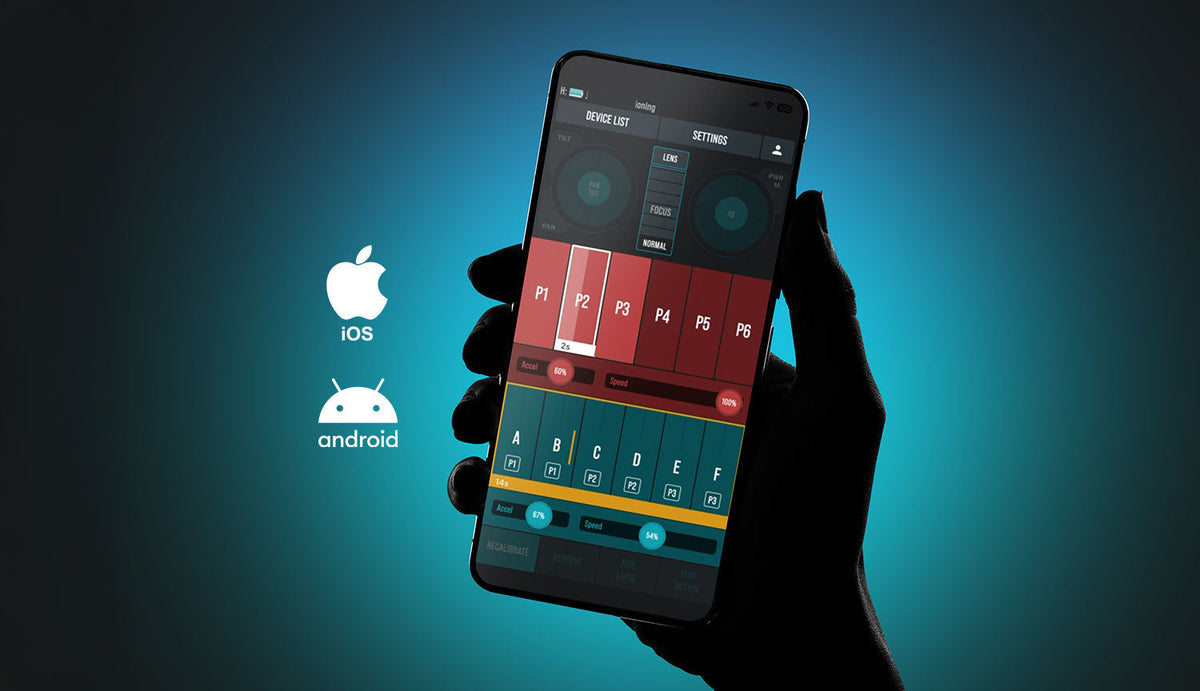
App v2 is available on the App Store and Google Play.
TestFlight is still available and serves a different purpose. The App Store build contains fully completed features. TestFlight is where we push experimental beta and alpha work for those who want to try things early.
App v2 also runs on Apple iPad and Mac. If you need to go back, you can switch to the legacy v1 app at any time. When you do, the app will prompt you to reset your firmware to match.
What's in the App Right Now
Legacy features, fully supported: Timelapse, Keypose (up to 12 positions), Point Mode, 360 Mode (Turntable and Panoramic).
Motion Chain is live across all body devices. JibONE and JibPLUS support Motion Chain in standalone use, without requiring a head device. Multi Point Motion Chain is also available.
Motion Chain Timelapse is available on Dolly products. Support across the rest of the ecosystem is still in development.
Free Move Mode for DollyPLUS is available.
Packshot Edge Bundle (SliderPLUS + Dual HeadONE) support is live, including turntable control in Point Mode.
Focus/Zoom Module v2 (previous generation) is supported and can be paired with HeadPLUS units.
iPad and macOS are supported. Multiple independent instances can be run side by side on iPad.
Roll Movement Integration gives you 3-axis control by adding Roll to Pan and Tilt. Requires the Roll Module. Roll axis is supported on HeadPLUS v3 PRO across all configurations, and a roll axis can be attached directly to a HeadPLUS for a standalone 3-axis setup without an additional body device.
Wired Communication for PLUS devices is available via the Link port. Requires the Link Cable included with HeadPLUS. Linking 3 or more devices requires the edelkrone Wired Signal Hub.
Live Mode keeps motors continuously engaged while the system is on, eliminating wake-up vibrations between movements. You can still make manual adjustments by gently pushing the system, which temporarily disengages the motors.
Vision Module monitor mode is live. Face tracking commands are still in development and expected this month.
Krone X Mini setup is now possible for HeadPLUS owners by combining JibONE and DollyONE.
Release History
August 24, 2026
- Vision Module monitor mode: The monitoring side of Vision Module support is now live in the app.
- DollyGO improvements: Chain timelapse support and joystick refinements.
- Tripod leveling fixes: Corrected leveling errors on tripod setups.
July 13, 2026
App
- Corrected the zoom joystick direction.
- Removed an unnecessary calibration screen when connecting Focus/Zoom Module PLUS PRO to HeadPLUS v3.
Firmware
- Rodeo Mode added for Krone X setups.
- Fixed an issue where JibPLUS motors would power on and off unexpectedly.
- Motors now respond faster when waking from sleep during point tracking.
- Failed-to-move detection added to DollyPLUS v2 and DollyONE v2.
- Resolved slowdown during point transitions while Focus/Zoom Module was in zoom mode.
- Fixed dolly hesitation during Link-connected movements in Krone X setups.
July 1, 2026
New Features
- HeadPLUS v3 PRO Roll Support: Roll axis infrastructure added to HeadPLUS v3 PRO. Roll axis can now be used across all configurations.
- Standalone 3-Axis Setup: A roll axis can be attached directly to the HeadPLUS without an additional body device.
- Krone X Mini Setup: HeadPLUS owners can combine JibONE and DollyONE to build a Krone X mini setup.
- Live Mode: A new setting that keeps motors continuously engaged while the system is on, preventing the wake-up vibrations that occurred when motors cycled off and on between movements. Manual adjustment still works by gently pushing the system, which temporarily disengages the motors.
Improvements & Bug Fixes
- Krone S Bundle: Fixed an issue that prevented changing the slider's targeting direction mid-shoot.
- Loop Mode Vibration: Resolved jitter in loop mode by keeping motors from powering off and on at the end of each movement.
- Joystick Inversion: Corrected the roll axis joystick direction to match standard expectations.
- Firmware Updates: Fixed a bug that caused firmware updates to stall or remain incomplete on certain devices.
June 24, 2026
edelkrone App v2 became officially available on the App Store, ending the TestFlight-only period for stable releases. Going forward, the App Store build always contains fully completed features, while TestFlight is used for earlier-stage beta and alpha work.
June 16, 2026
New Features
- Roll Movement Integration: 3-axis control by adding Roll to Pan and Tilt movements using the HeadPLUS and HeadONE combination. Requires HeadPLUS, HeadONE, and the Roll Module.
- Wired Communication for PLUS Devices: Link SliderPLUS, JibPLUS, DollyPLUS, and HeadPLUS via cables for a stable, zero-drop connection. Useful in crowded wireless environments. Requires the Link Cable included with HeadPLUS. Linking 3 or more devices requires the edelkrone Wired Signal Hub.
Improvements
- Enhanced Jib Tracking: Tracking on all Jib products is significantly more responsive with higher resolution. Especially noticeable over the wired Link port connection.
- Faster JibONE with HeadPLUS: Slowness issues when pairing JibONE (v1 and v2) with HeadPLUS resolved.
- Apple Device Battery Display: Improved battery level monitoring and display accuracy.
Bug Fixes
- Fixed an issue where the app would sometimes misread a press-and-hold on a position button as a tap, causing unintended camera movement.
- Resolved a jitter bug when repositioning an active point using Frame Shift in Point Mode.
- Fixed a bug that caused SliderONE to incorrectly prompt for a firmware update at startup.
- Hidden inapplicable options from menus to clean up the UI.
- Corrected minor display errors for device names and firmware versions in the Settings info screen.
May 19, 2026
- Fixed an issue where the 360 mode interval was not working correctly.
- Resolved mid-motion slowdowns in the motion chain.
- Corrected point tracking errors in Packshot Edge Bundle setups.
- Minor bug fixes and performance improvements.
May 12, 2026
- Increased Keypose Limit: Savable keyposes raised from 6 to 12, allowing significantly more complex motion chain sequences.
- Simplified Calibration: Head calibration on sliders streamlined to a single unified standard, with updated on-screen visuals. Please follow the new visual guides carefully during calibration.
- Standalone Motion Chain for JibONE & JibPLUS: Both jibs support Motion Chain without requiring a head device. All edelkrone body devices can now independently execute motion chains.
- Minor optimizations and bug fixes for overall app stability.
April 2026
- Turntable Center Improvements (PackShot Master Bundle): Direct center marking when the center is physically visible, a Skip feature that keeps taught points fixed in space during turntable rotation, and Laser Module support for center teaching. One tap when the center is visible, two taps when it is not.
- Multi Point Motion Chain: Points can be assigned to Positions. The system transitions to both simultaneously, unlocking complex layered camera moves. Shot Breakdown videos are available on the edelkrone Academy.
- Replace Position in Motion Chain: Saved positions can be updated without deleting and recreating them.
- JibONE & JibPLUS point tracking improvements: Noticeably more consistent tracking when calibration is accurate.
- JibPLUS Drift Lock: Motors hold a soft-lock state at the end of each move. The jib holds its position until nudged by hand, at which point the lock releases automatically.
- iPad & macOS support: App v2 runs natively on iPad and Mac. Multiple independent instances can be opened side by side on iPad.
- Tap to Save: Saving a Position, Keypose, or starting point teaching requires a single tap instead of a long press. Long press is still used to delete.
- Independent speed & acceleration per transition type: Point and Position transitions have separate speed and acceleration settings.
- Focus Shift: Single vs. Global (Point Mode): Single Shift adjusts focus when the target surface is behind the taught point. Global Shift offsets the entire lens map to reconcile the camera's mathematical and physical positions.
- Packshot Edge Bundle, turntable in Point Mode: One HeadONE handles point tracking while the other drives a turntable.
- Lens Mapping, redesigned: Streamlined flow from infinity to close focus. The Lens Community database was reset as part of this change.
- Dolly: Match Position: Clears accumulated positional drift by letting you physically return the dolly to a known location and resync. Demo available on the edelkrone Academy.
- Dolly: Arc & Line Path Flexibility: When the dolly is pulled off a path manually, the app offers three options: Move Path, New Path, or Recover Path.
- Focus/Zoom Module v2 support: Previous generation module fully supported in App v2.
Launch (Early 2026)
- Timelapse, Keypose, Point Mode, 360 Mode (Turntable and Panoramic) — all legacy features supported.
- Motion Chain (requires Head and Body device pairing).
- Free Move Mode for DollyPLUS.
What's Coming Next
| Feature | Target |
|---|---|
| Vision Module face tracking (completes Vision Module support) | September 2026 |
| Phone Mode Return | October 2026 |
| Motion Chain Timelapse across the full ecosystem | November 2026 |
On Tap to Move
We need to be direct about this one. Controller-free operation, which we called Tap to Move, is not going to ship. We were not able to get it to a level of reliability we would be comfortable putting in your hands, and we would rather say that plainly than keep moving the date.
We know some of you may have purchased a product specifically because this feature was on our roadmap. If that is your situation, please get in touch with us. We want to make it right.
A Note on All of This
When you invest in edelkrone hardware, the software running it should keep getting better over time. That is the commitment. Some updates arrive on schedule, some arrive late, and occasionally something does not arrive at all. We will keep being straight with you about where things stand, including when the news is not good.
If you are using any of the new features and running into something unexpected, the edelkrone Academy is a good first stop. More updates are on the way.
The edelkrone Team